
Description
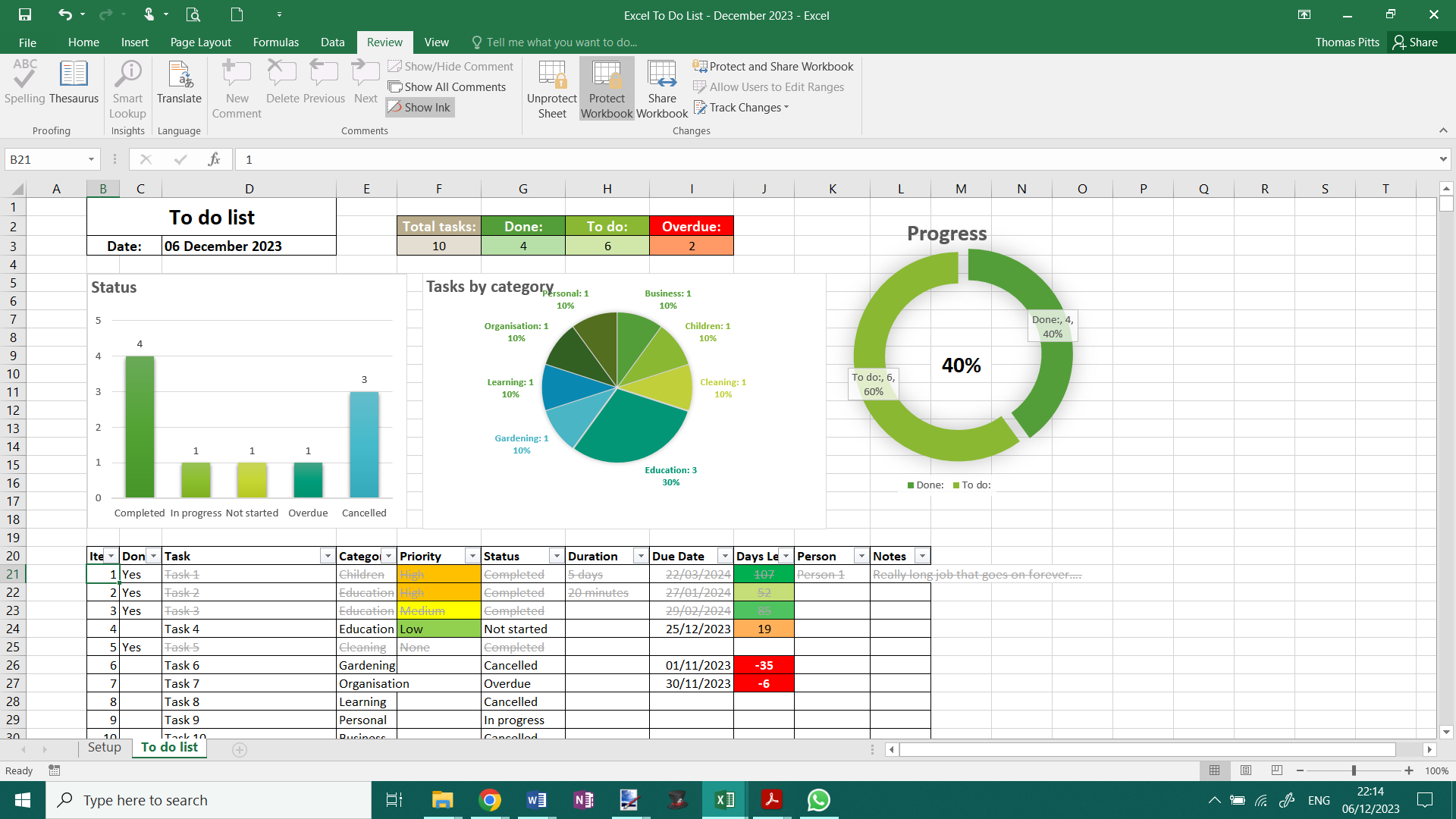
In the To-Do List, a spacious canvas awaits for listing up to 1000 tasks, providing ample room for your goals and objectives. Prioritise tasks with ease, assign categories, specify statuses, or allocate them to individuals — fostering clarity in your workflow. Add deadlines for urgency and witness the automatic calculation of days remaining, effortlessly synchronising with your device’s current date.
Elevate your productivity and bid farewell to scattered notes with my meticulously crafted Editable To-Do List Spreadsheet for Excel. Developed in November and December 2023, this dynamic tool empowers you to efficiently organise tasks and reclaim control of your time, replacing the chaos of countless sticky notes.
Unlock a new level of efficiency with features designed to streamline your workflow. With compatibility extending to Office 2021 or later, as well as Microsoft Excel 365 subscription, this versatile spreadsheet ensures seamless integration into your existing tools.
Upon purchase, you will be able to download the Excel file directly from the email and embrace the simplicity of staying organised and ahead of your tasks.
Revolutionise your approach to productivity — one click at a time.
How it works:
Unleash the full potential of organisation with my user-friendly Editable To-Do List Spreadsheet, featuring powerful customisation options and a seamless interface for optimal task management.
Navigate to the Setup tab, your control centre for tailoring information across the entire spreadsheet. Craft personalised dropdown lists to effortlessly populate details in various sections of the spreadsheet. The Setup tab lets you fine-tune the tool to your preferences, ensuring a personalised experience.
Enhanced fields such as Duration and Notes offer flexibility for additional inputs, tailoring the spreadsheet to your unique needs. Utilise the intuitive sort function, conveniently located beside each column heading, to arrange tasks according to your preferences.
Effortlessly track progress by marking tasks as completed in the Done column with a simple “Yes,” transforming them into visually distinct entries through subtle greying out and striking through.
Embrace a streamlined approach to task management with my Editable To-Do List Spreadsheet — your key to productivity excellence.
Features
– Easy setup
– To-do List
– Options to prioritise tasks
– Editable categories to sort tasks
– Priority & Status drop-down menus
– Optional task duration
– Due date, days left and days overdue are automatically created from today’s date
– Space to allocate to a person in charge of each task
– Space to write important notes
– Filter funnel for easy sorting
– Overall progress chart
– Priority chart
The spreadsheet looks and works best on a desktop/computer.
______________________________________________
Important Notice:
All designs contained herein are the exclusive intellectual property of ThomasJPitts and are protected under copyright law. This item, meticulously crafted from inception in November and December 2023, is intended for personal use. It is expressly prohibited to resell, redistribute, or utilise this item for commercial purposes without explicit authorisation.
______________________________________________
Digital Product Disclaimer:
Kindly note that this offering is a digital product, with instant access upon completion of purchase.
This eliminates the need for waiting periods or incurring shipping fees. A one-time purchase grants ownership for life. No physical product will be dispatched.
Reviews
There are no reviews yet.